4.1.3. Coupled one-dimensional Poisson equations with Dirichlet boundary conditions
The power of defining the equations in classes easily lets you combine multiple equations. Let us now solve the following system
\[\begin{split}\begin{aligned}
-\nabla^2 u&=w \\
-\nabla^2 w&=-10u \\
\end{aligned}\end{split}\]
subject to \(u(-1)=u(1)=0\) and \(w(-1)=-w(1)=1\). The code just creates two instances of the PoissonEquation from the previous file poisson.py with different names, combines both and couple both equations via the source terms:
from pyoomph import *
from poisson import PoissonEquation  # Load the Poisson equation for the previous class


class CoupledPoissonProblem(Problem):
    def define_problem(self):
        mesh = LineMesh(minimum=-1, size=2, N=100)
        self.add_mesh(mesh)

        u, w = var(["u", "w"])  # Bind the variables to use them mutually as sources
        # Create two instances of Poisson equations with different names and coupled sources
        equations = PoissonEquation(name="u", source=w) + PoissonEquation(name="w", source=-10 * u)
        equations += DirichletBC(u=0, w=1) @ "left"  # Dirichlet conditions u=0, w=1 on the left boundary
        equations += DirichletBC(u=0, w=-1) @ "right"  # and u=0, w=-1 on the right boundary
        equations += TextFileOutput()
        self.add_equations(equations @ "domain")


if __name__ == "__main__":
    with CoupledPoissonProblem() as problem:
        problem.solve()  # Solve the problem
        problem.output()  # Write output
Also note how DirichletBC takes multiple keyword arguments to set multiple boundary values.
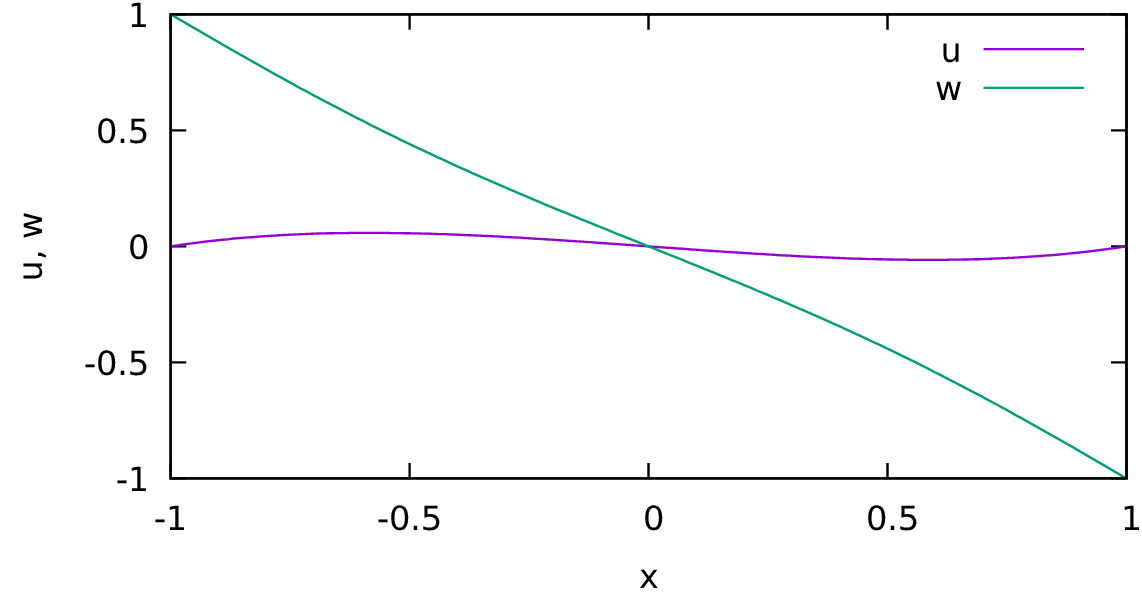
Fig. 4.2 Coupled Poisson equations with Dirichlet boundaries.