3.10.1. A harmonic oscillator driven by a trapezoidal forcing
Let us again consider a nondimensional harmonic oscillator, but now with a custom driving function, which resembles a trapezoidal pulse. This custom pulse function can be implemented in pyoomph via the CustomMathExpression class from the pyoomph.expressions.cb module as follows:
from pyoomph.expressions.cb import * # Custom math expressions


class TrapezoidalFunction(CustomMathExpression):
	def __init__(self,*,wait_time=5, flank_time=0.25,high_time=10,amplitude=1):
		super(TrapezoidalFunction, self).__init__()
		self.wait_time=wait_time # Pass some parameters to the function already in the constructor
		self.flank_time=flank_time
		self.high_time=high_time
		self.amplitude=amplitude

	# This method will be called whenever the function must be evaluated
	def eval(self,arg_array):
		t=arg_array[0] # Bind local t to the first passed argument
		if t<self.wait_time:
			return 0.0 # Before the pulse
		elif t<self.wait_time+self.flank_time:
			return self.amplitude*(t-self.wait_time)/self.flank_time # flank up
		elif t<self.wait_time+self.flank_time+self.high_time:
			return self.amplitude # at the plateau
		elif t<self.wait_time+2*self.flank_time+self.high_time:
			return self.amplitude*(1-(t-self.wait_time-self.flank_time-self.high_time)/self.flank_time) # flank down
		else:
			return 0.0 # after the plateau
In the constructor, we take the parameters that are fixed during the simulation, namely the quantities describing the shape of the pulse. Then, the method eval() has to be implemented, which takes a list object arg_array as parameters. In this list object, the current numerical values of the passed parameters (here, it will be the time \(t\) later on) are stored. Based on this value, we return the current value of the pulse.
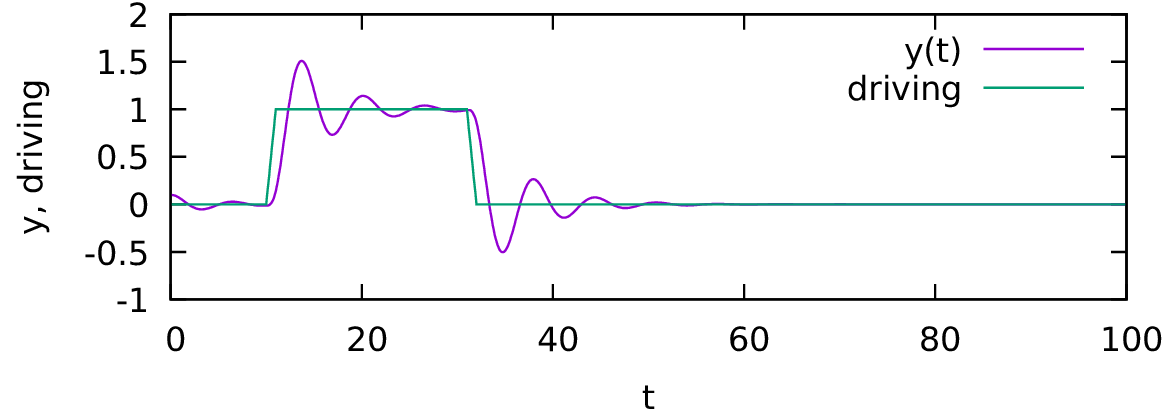
Fig. 3.9 Using a CustomMathExpression, we can implement custom functions, here the trapezoidal driving.
Warning
All custom functions must be deterministic on their input arguments, i.e. evaluating the function eval() multiple times for the same input must yield the same result. This rules out any contribution of random numbers or any dependence on the degrees of freedom or parameters which are not passed via the argument list arg_array.
The problem class looks like this, where we reuse the predefined HarmonicOscillator equation class:
class TrapezoidallyDrivenOscillatorProblem(Problem):

	def define_problem(self):
		t = var("time")
		# Create a trapezoidal driving
		driving = TrapezoidalFunction(wait_time=10, high_time=20, flank_time=1)
		# Evaluate at t (which is the current time) and wrap it in a subexpression (optional, but recommended)
		driving = subexpression(driving(t))
		# pass the driving function evaluated at t here
		eqs=HarmonicOscillator(omega=1,damping=0.2,driving=driving,name="y")
		eqs+=InitialCondition(y=0.1)
		eqs+=ODEFileOutput()
		eqs+=ODEObservables(driving=driving) # Also output the driving to the file
		self.add_equations(eqs@"harmonic_oscillator")

if __name__=="__main__":
	with TrapezoidallyDrivenOscillatorProblem() as problem:
		problem.run(endtime=100,numouts=1000)
The result is depicted in Fig. 3.9.