6.4. Mesh reconstruction upon large deformations
It happens frequently that a moving mesh deforms strongly so that the elements are not well suited for solving equations on it. In that case, it might be necessary to regenerate the mesh by fitting the interfaces with splines, recreate a new mesh and interpolate all defined fields, including their history values for time stepping, of the previous mesh to the new mesh. pyoomph can do this automatically with the RemeshWhen class, which must be added to bulk domains. At the moment, this only works for two-dimensional meshes. Furthermore, it is necessary to set the property remesher of the MeshTemplate to a Remesher2d instance from the module pyoomph.meshes.remesher. Thus, for an example problem, we first have to make sure to import the module and set the remesher attribute to a Remesher2d, which requires the mesh template as first argument for the constructor:
from laplace_smoothed_mesh import *
from pyoomph.meshes.remesher import *

class RemeshingProblem(Problem):
     def __init__(self):
             super(RemeshingProblem, self).__init__()
             self.remeshing=True # shall we remesh or not
             self.remesh_options=RemeshingOptions(max_expansion=2,min_expansion=0.3,min_quality_decrease=0.2) # when to remesh

     def define_problem(self):
             # Create a mesh and add a remesher
             mesh=RectangularQuadMesh(N=6)
             mesh.remesher=Remesher2d(mesh)
The RemeshingOptions control when a mesh reconstruction shall be invoked. The parameters max_expansion and min_expansion give a threshold for which remeshing is invoked whenever an element has grown or shrunken above max_expansion or below min_expansion with respect to its initial size. This is determined based on the Cartesian area of each element. Furthermore, a min_quality_decrease can be set to the RemeshingOptions, since the area of an element can still remain quite close to its initial area, but the element becomes strongly anisotropic, e.g. by expanding in one direction while collapsing in the perpendicular direction.
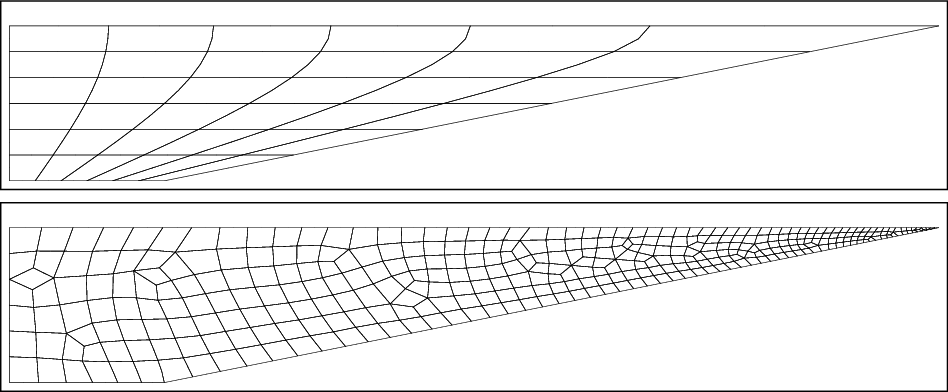
Fig. 6.3 Without remeshing (top), the mesh can strongly deform. With remeshing (bottom), one can prevent this (at the cost of some computational time and small interpolation errors). One can furthermore control the local mesh size, e.g. to ensure a fine mesh at the sharp corner.
After that, the equations are assembled as usual. Here, we fix all boundaries except the "right" one, which will move with time:
# Add the mesh and use the Lagrange smoothed mesh
self.add_mesh(mesh)
eqs=LaplaceSmoothedMesh()
eqs+=MeshFileOutput()
# Fix some interfaces
eqs+=DirichletBC(mesh_x=0,mesh_y=True)@"left"
eqs+=DirichletBC(mesh_x=True,mesh_y=0)@"bottom"
eqs+=DirichletBC(mesh_y=1)@"top"

# Moving boundary
xi=var("lagrangian")
eqs+=DirichletBC(mesh_x=1+0.5*xi[1]*var("time"))@"right" # move the right interface with time
To automatically invoke remeshing, we just must add a RemeshWhen object to the domain, which takes RemeshingOptions as argument. When there are no further instructions added, pyoomph tries to estimate the local mesh resolution based on the previous resolution. This does not always work well and sometimes it is beneficial to instruct pyoomph to use specific mesh sizes instead. To that end, one can add RemeshMeshSize objects to interfaces and corners, by what the local mesh size (nondimensional, in terms of the spatial scale) can be set:
# Remeshing based on the options
eqs+=RemeshWhen(self.remesh_options)
# optional: setting particular sizes at interfaces or corners
eqs+=RemeshMeshSize(size=0.2)@"left" # size of 0.2 at the left interface
eqs += RemeshMeshSize(size=0.02) @ "right/top" # size of 0.02 at the top right corner

self.add_equations(eqs@"domain")
To run the simulation, there is nothing specifically to be done:
if __name__=="__main__":
     with RemeshingProblem() as problem:
             # problem.remesh_options.active=False we can deactivate remeshing by the remesh options as well
             problem.run(10,outstep=True,startstep=0.5,maxstep=0.5)
As usual, the RemeshingOptions can be modified before the run() statement. In particular, one can deactivate it by setting active=False. A comparison without and with remeshing is shown in Fig. 6.3.
One additional option is to add an instance of the class SetLagrangianToEulerianAfterSolve to the equations of the moving mesh domain. This will set the Lagrangian coordinates to the Eulerian coordinates after each successful time step. Thereby, the mesh displacement in (6.1) will be zero at the beginning of the next time step.