12.2. Non-matching meshes and passing vectorial quantities
The preCICE tutorial also covers a generalization of the previous case.
It solves exactly the same equation as in the previous, but the domains are different. One participant is now a rectangle with a circular hole and the other is the missing circular domain that fits in the hole. Most interestingly, the nodes do not have to match at the coupling boundary. While such non-matching coupling is possible in oomph-lib, it cannot be done in pyoomph directly yet. preCICE, however, does not care about the resolution and node positioning at the coupling boundaries, provided that it can find a corresponding node in the coupled participant.
The changes compared to the previous case are minor. Mainly, we need another mesh:
class RectMeshWithCircleHole(GmshTemplate):
    def define_geometry(self):
        pr=self.get_problem()
        y_bottom, y_top = 0, 1
        x_left, x_right = 0, 2
        radius = 0.2
        self.mesh_mode="tris"
        self.default_resolution=0.1
        midpoint = self.point(0.5, 0.5)
        outer_lines=self.create_lines((x_left, y_bottom), "bottom", (x_right,y_bottom),"right",(x_right,y_top),"top",(x_left,y_top),"left")

        # Make non-matching meshes for testing
        circle_res=0.025 if pr.precice_participant=="Neumann" else 0.05

        circle_lines=self.create_circle_lines(midpoint,radius=radius,line_name=None if pr.precice_participant=="" else "interface",mesh_size=circle_res)
        if pr.precice_participant!="Neumann":
            self.plane_surface(*outer_lines,holes=[circle_lines],name="domain")
        if pr.precice_participant!="Dirichlet":
            self.plane_surface(*circle_lines,name="domain")
We create either the full mesh for the monolithic run, otherwise, we either create a fine circle for the Neumann problem or a box with the corresponding circular hole in the Dirichlet case. The meshes do not match, since the resolution of the Neumann mesh is smaller. For the coupling interface, we define the boundary "interface", which is not required for the monolithic case.
Furthermore, as in the preCICE example, we pass the heat flux as vector now. This means we have to change the PreciceWriteData in the Dirichlet participant to
coupling_eqs+=PreciceWriteData(**{"Heat-Flux":grad(var("u",domain=".."))},vector_dim=2)
Vectorial quantities must be marked with vector_dim, otherwise, it is a scalar. However, it also must agree with the definition in the config file precice-config-circle.xml.
Likewise, reading and imposing the vectorial flux on the Neumann participant is now different:
coupling_eqs+=PreciceReadData(flux="Heat-Flux",vector_dim=2)
coupling_eqs+=NeumannBC(u=-dot(var("flux"),var("normal")))
Here, we have to consider the minus sign in the NeumannBC, since it has to agree with the weak formulation.
The rest is mainly the same. However, in the config file precice-config-circle.xml, we relax a bit the threshold for convergence and use acceleration. Therefore, this problem requires less simulation time than the previous example.
For running with preCICE, you must place the config file precice-config-circle.xml in the same directory and run again the script two times simultaneously:
python partitioned_heat_conduction_circle.py --outdir Dirichlet -P precice_participant=Dirichlet &
python partitioned_heat_conduction_circle.py --outdir Neumann -P precice_participant=Neumann
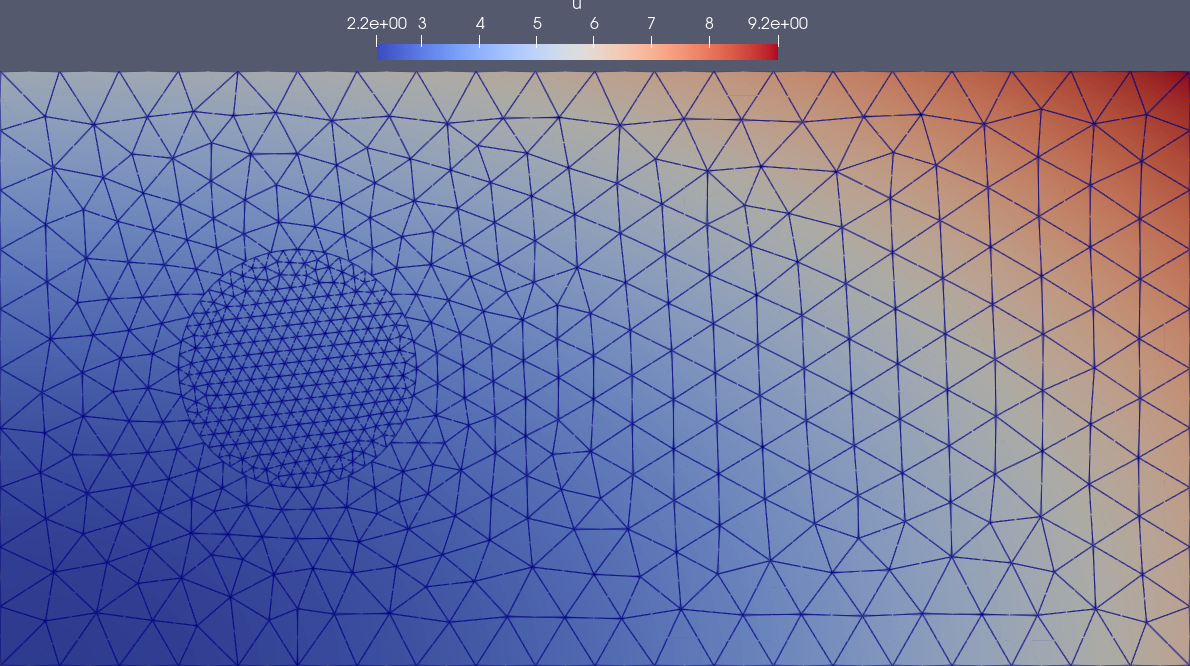
Fig. 12.1 Dirichlet/Neumann coupling with preCICE on non-matching meshes and with vectorial heat fluxes